ZOOM

                This past week we used zoom to do a synchronise class from the comfort of our own homes. Overall it worked out well and I got to learn about some of the features of zoom I hadn’t seen before. Like the grouping feature is really cool and would be useful if you were using it for online education to divide the class into working groups. The only negative part of my experience with Zoom was the audio when more than one person was talking, which may have been different had we all been in different places.

                I would definitely use zoom in my classroom communicate with students who might be out sick, out for other medical reasons, on vacation or away from school for other reasons. This will give them the opportunity to still participate in classroom discussions without physically being present in class. Another way I would use zoom in the classroom is for guest speakers to help enhance lessons or keep students engaged. I have had guest speakers or presenters come to my class before when I was in placement, and students are honestly so engaged when it is someone else at the front of the classroom that I am sure it would be the same if they were talking to them through Zoom. Another interesting idea is that if a student is on vacation have them zoom with the class and be the expert on the place that they are in. Let them tell the rest of the class all about the place they are in.

                Zoom can be a great tool to use in the classroom to help educate our students on the advancements in technology. We can actually have a conversation with someone in Australia in our everyday classroom using this. I believe it is important to show students these opportunities so that they are aware that these types of technologies are available for them to use.

Distance Education

This week was a busy one! We started it off with a long weekend (woohoo), and then I found my self working on homework for all my classes at all hours of the day! That being said, we did get to have a presentation on distance education. I wasn’t sure how this presentation would go considering it is based mostly towards high school, but there was some interesting links and information. I never took a class through distance education while I was in high school, but I did see them happening in my school.

                The types that I saw through my schooling were the ones done through correspondence. So they basically had a giant work book and had to finish it by a certain date, and then they sent it away to be assessed. After they were done their assignment’s they also had to write a test for the course. I find it interesting to think about how much it has changed just since I was in school. It seems, from the presentation on Wednesday, that most of the distance education is done online now which is more efficient for both the teacher and the student.

                The other type of distance education I saw in high school, was through a T.V. placed at the front of the classroom and we were watching the class happen at another school. We could see them, and they could see us and we could interact with the teacher and other students. Living in a rural community, if you wanted a specific class you were going to have to do it through distance education so I find it interesting that we were able to use a video conference tool to do a calculus class.

                The only question or problem that I have is that it puts the responsibility on the student. Which is not a bad thing, but how do we encourage them to get it done. Through tutoring, I have witnessed a someone get the book and leave it till a few weeks till grad and then not get it done. So I was just wondering if anyone had any ideas or tips about how we engage students in their online or text courses and motivate them to get it done!

Tech Task #5

The resource I wanted to tell my classmates about is actually an app called Kodable. It is a coding app used to help younger student with the beginning step of coding. I got to see it in my placement in Strathclair, and the students loved when they got to spend time doing their coding. The app has different levels and customization options that help to keep students engaged!

You start out as a basic fluff and begin your adventure through the mazes in the first level. While you are going through the maze you have to use coding techniques to make your fluff turn, go straight, stop, start, etc. The students of course didn’t know how to use these skills, so we had a coding coach come in an work with the students to develop the skills to help them continue through the mazes. At the end of each maze they can unlock a new fluff which is really exciting for the students and keeps them excited about finishing a level that they might be stuck on. My favourite part of this app is that it scaffolds the information for the students. At the first level you are just doing the basics such as learning how to make their fluff go straight to the finish line and stop. Then the next world the unlock they will learn how to make their fluff go left and right and make turns. The next world adds colours so it may ask your fluff to turn when there is a red square so the students need to learn how to make their fluff do that. It just continues to get harder once the students have mastered the skills and again we had a coding coach come in and help the students by showing them the skill they would need for that world.

I love that this app is a starting point for talking about coding with our students and it seems like a game so they are having fun doing it while developing the skills. We used it as a first step in which the next step was using the robots Dash and Dot. Once the students finished enough levels they got divided into teams and got to work with the robots, taking turns, so everyone got a chance to try the skills they learned in Kodable and applying them to the robot.

Kodable is a great learning tool for coding and is really easy to use. As a teacher who had no idea how to teach coding, I was able to walk around and assist students who needed it. I definitely recommend that you try them out!

Tech Task #8 – Infographics

What is an Infographic?

                As far as I can tell from the research, I have done infographics are a visual representation of data or different information. They can be used to represent what might be seen as an abstract or difficult to understand concepts and simplify the material. We see these quite a bit in everyday life whether that be online, during presentations or lectures at school as well as on bulletin boards around school. They are a flashy way to catch a reader’s attention and display different types of data.

                I believe this could be extremely useful in the classroom. As I said above, they are flashy and visual so students will love this. I believe that anything visual helps students comprehend the materials a little bit more, so displaying this at the beginning of the unit to show the different topics you are going to cover, or using it to show different animals that have similar ecosystems could be a great benefit to students who might need that little bit of visual aid with the written information.

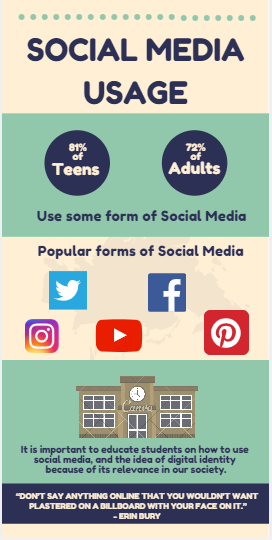
                Another awesome idea could be to have students create their own maybe based on a science unit such as different animals or ecosystems. By creating an infographic, students could demonstrate their knowledge in the subject area while expressing their creative side. I believe this could be a great way to review before an assessment or could even be used as an assessment! I tried my hand at creating my own and it is quite easy, there are awesome templates and symbols that are accessible through the website I used! So here is my infographic based on social media usage!

Tech Task #3

                A traditional teacher had different types of connections in their life such as colleagues, family, students, curriculum etc. The idea of a connected teacher takes that to a whole other level. A connected teacher still has all the connections a traditional teacher but with the additional of any digital connections as well such as creating an online presence, having class profiles on social media and all the resources. Not to mention the endless emails from parents, colleagues and then personal connections. These digital connections can improve a student’s ability to connect with their students even more.

                Students in todays society are so connected, to each other, to their family, and to the world around them. Social media gives them the chance to become a connected student and know more about the world around them. Students now a days have many connections if not just as many as a connected teacher. While they are different students still have connections to family, online resources for their interests, posting pictures on the social media, staying connected with friends, school work, and different events going on around the world. In terms of things happening around the world, students can find out about a disaster or shooting happening across the world within minutes of it happening because of social media.               

  This impacts me as a teacher because students have access to so much knowledge and connections across the world, thanks to technology, so it is important to utilize this as much as we can and create an environment where students can share the knowledge and connections they have made. I feel as an early year’s teacher it is important to keep up to date with current technological advances in order to properly educate our students on what they need to successfully take part in this digital world.

Blog Post – Pros & Cons of Social Media

This week we continued to discuss how we can use social media in the classroom. While there are many positive aspects to using social media there can also be some negative ones as well. It was really interesting to hear what everyone came up with, while most of them were similar there were definitely some that I hadn’t though about before.
                The ones that stuck out to me as potential problems in the an early years classroom were privacy, cyber bullying and of course distractions. The big worry I believe is privacy. It plays a huge role more for the parents than the actual students. Parents can be very worried about their child’s picture or name being put online so they may ask that their student is not captured in any pictures or written about in any kind of blogs. One thing I have heard of is explaining to parents that when you put the picture up of the student it will not include their name and visa versa. This protects their full identity becoming available online. Another solutions would be to have a private account for parents to follow to see what their kiddos are up to but not for anyone else to see.
                As for cyber bullying the only thing we can really do is just educate them on the consequences of cyber bullying and trying to instill empathy in our students. Explain to them that even if it is online it still hurts just as much as face to face and that we need to treat others with kindness. Lastly distractions can be a problem in any classroom activity, especially with young students, but adding in technology enhances that. I believe that if you take the time to develop expectations or a “contract” with the students for when they are using technology, then you can hold them accountable if they are not doing what they are supposed to be doing. Along with this also comes routine, the more you use technology in your classroom and make it part of their everyday, the less likely they will be to become distracted when they get the opportunity to use it.
                Some of the positive things about social media are of course helping students develop digital identity, which I have mentioned in previous blog posts, access to information and engagement. The one that I see as the most important is the access to information. With social media at their fingertips, they are able to see what is happening across the world at any given moment. They also have access to facts on different animals, ecosystems, countries and so much more. Students have so much information they can find, it is our job as educators to teach them how to differentiate between what is real and what is not. The other positive to social media is how engaging it can be. Students love technology and anytime it has been brought into my classrooms during placements the students have been so engaged and excited! Social media really is changing the way we teach, and I cant wait to see where it takes us in the future.

Tech Task #2

                Looking at my digital identity online, googling myself, I wasn’t too surprised with anything that I found. All that came up was my social media accounts such as Twitter, Instagram and Facebook. My social media accounts are pretty clean, and I do not have anything to hide so I was not too concerned but for someone who is unaware of the impact of their online presence can have on their everyday life this could have a serious impact. In a world where technology is so advanced it is important that we realize the impacts in can have on our lives. It is important to realize it is not a second identity but a digital version of yourself and we should use it to create a positive image of ourselves.

                This is why our digital identity is so important. When it comes to applying for future jobs our social media can either greatly improve our chances or seriously hurt us. With our whole lives online, it is important to realize the pros and cons to creating an online persona. For young people it may seem like harmless fun to post comments and photos but the impact that these comments can have on their life outside of the platform.

                While I was in school, I don’t remember them ever having this type of conversation with us. I remember having a presentation about cyber bullying and having people talk about the impacts of cyber bullying, but they never talked about the idea of digital citizenship. I believe it would have benefited my classmates and I to know that future employers will be looking at our online profiles before considering us for a career we have worked towards for so long. They teach you how to create a resume and how to be professional, but they don’t tell you how big of an impact your online presence can have.

                While I didn’t get that education while I was in school, I want to help my future classes by starting that conversation with them. I believe it is important for students to lead this discussion, ask questions so we can help guide their learning on this massive idea of digital identity.

Tech Task #6

                One of my favourite websites I have used in my classroom is Mathletics. In an early years classroom it can be hard to create excitement about math, in my last placement I got to see the beginning stages of using Mathletics. Let’s be honest as soon as a laptop cart or iPads are mentioned in the classroom, students are already excited. Incorporating technology in math isn’t always easy but Mathletics makes it easy and fun!

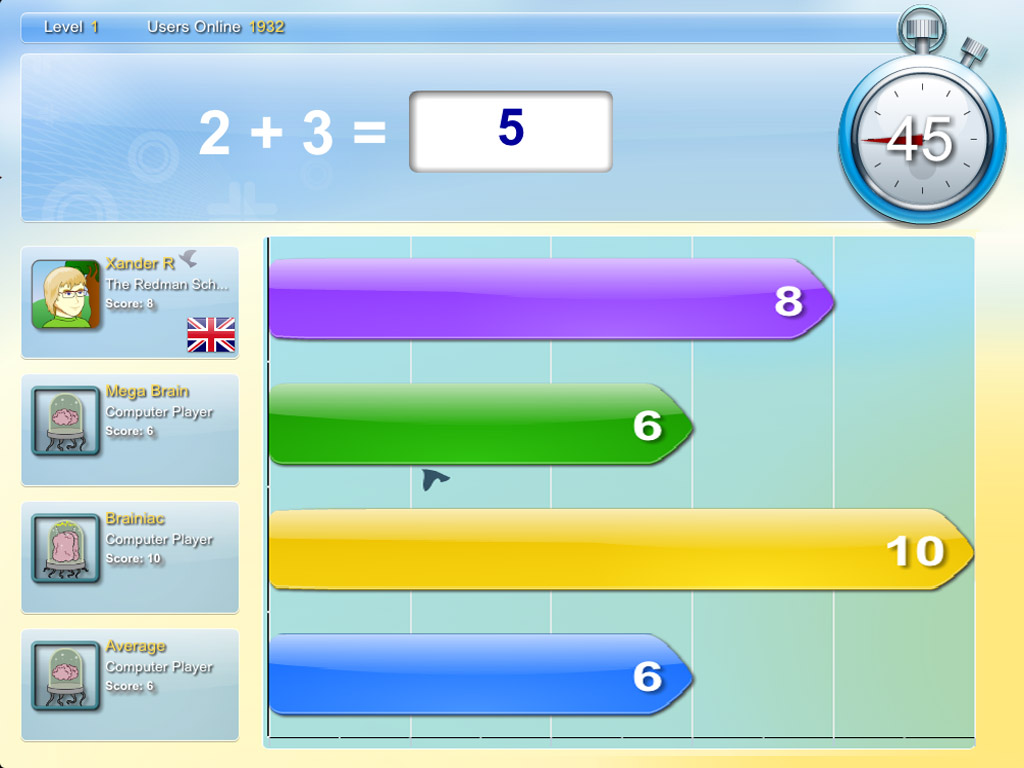
                Mathletics is a website where each student gets their own profile and then the teacher can assign each student different assignments. This is one of my favourite parts. Students get individualized assignments and are so busy doing their assignments they are not worried about what the person beside them are doing. Therefore, students wont notice that they are at different levels but will just focus on getting their assignments done. Once the students are done the assignment the teacher assigned, they can move onto the live mode. This allows the students to compete with other students in the class in a mental math show down. Not only can they compete with other students in the class, but they can also compete with other people across the world, this is completely safe as there are no pictures of the students online and they are only under their first names and you could do code names if you were concerned with the safety of your students. Overall this app us just a fun interactive way to get students excited about math!

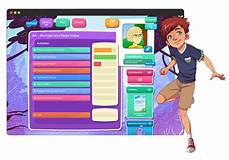
                Since I mentioned my favourite part, I should mention the student’s favourite part. Students get to customize their own avatar who represents them in the world of Mathletics. One thing I noticed when I saw this in my placement is that students would get easily distracted by their avatar during class time. My cooperating teacher and I came up with the idea that students were to edit their avatar at home and do the activities at school and our students knew the expectations that we had when they were using Mathletics and knew the consequences for not following those expectations.

                Unfortunately, there is a cost that comes with the use of this website so I couldn’t get logged into my free trial anymore, but I have attached some screenshots that I found on google and a link to the website. If you haven’t tried it, I encourage you to try it out and see what you think!

Link: http://ca.mathletics.com/

Social Media in the Classroom & Cyber Bullying

                This week we had a presentation on using social media as educators and the benefits it can have on our students. Kristen Thompson spoke about 3 big reasons we should be teaching social media in the classroom. The reason that stuck out most to me was prevalence. So many Canadians have social media and use these for work purposes as well as personal reasons. I believe it is important that students are taught the pros and cons of social media as well as how to properly use it.

                Many of our students will already have social media accounts and some may know more about how to use it than we do. This seems to be a trend in todays society, the younger generations are becoming more advanced with social media and the internet which is why we need to educate them on it sooner rather than later.

                It is important to educate them on topics such as digital citizenship, their online appearance but the biggest one that I believe is cyber bullying. I found a video online that could be used to educate students on social media and the dangers of cyberbullying. It would work really well for younger students for it explains to students why we shouldn’t cyberbully and how it might make other people feel. It talks about thinking before we post and putting yourself in the other persons shoes before saying something online. but it also breaks it down and explains to them what to do if they are being cyberbullied. This video could really impact students and help with the never-ending problem of bullying that is prevalent in most schools.                            

Another important reason to educate students on the use of internet and social media is that it is used in most job places now. Whether you are sending emails to your boss or coworkers or doing marketing online for a company you work for the internet plays a huge role in the work place. This is why we need to give students the tools they need to succeed in the world after school and allow them to explore these tools in the safety of a classroom. By allowing students to experiment with social media in the classroom it will help them develop skills as well as how to have an appropriate online presence.

Blog #3 – Technology in the Classroom!

                This week we talked about some ways to use technology in the classroom. We had Tyler come in from Vincent Massey and explain the different ways he uses technology in his everyday classroom. Some of these included using online study tools, using snapchat or Instagram to develop characters in a novel and using online polling to create an outside audience for class activities.

                My favourite idea from the presentation was having students create Instagram accounts for characters in a novel. This would give students an opportunity to develop an understanding for how the character would interact on social media as well as with other characters from the novels. While being in early years I was trying to come up with a way to use this in an early year’s classroom. I think I forget how young children already know how technology works and could do this task, the only concern I have is them having to create an email and an account so I would like to come up with some kind of alternative for early years.

                Another one I really enjoyed was the best word competition he created online. I have already done picture of the day in my classroom but to make it so students could write for an outside audience, and encourages students to do their best writing. You could even send the link how so students parents could read through them and vote on which word they liked!

                This was an awesome presentation that gave many awesome ideas!